Nmap is one of the most powerful and widely used tools in cybersecurity, providing analysts with the ability to perform reconnaissance, identify exposed services, detect vulnerable configurations, and validate network security posture. Whether you are preparing for the CySA+ exam or conducting real-world defensive assessments, understanding how to use Nmap effectively is fundamental. This guide walks through essential Nmap techniques, from discovering active hosts to enumerating services, detecting versions, and leveraging Nmap Scripting Engine (NSE) for enhanced insight.
The commands demonstrated here are safe to run in home labs, TryHackMe rooms, or isolated environments. With just a few scans, analysts can build an accurate picture of what systems are active, what ports they expose, and what risks those systems may pose.
Host Discovery
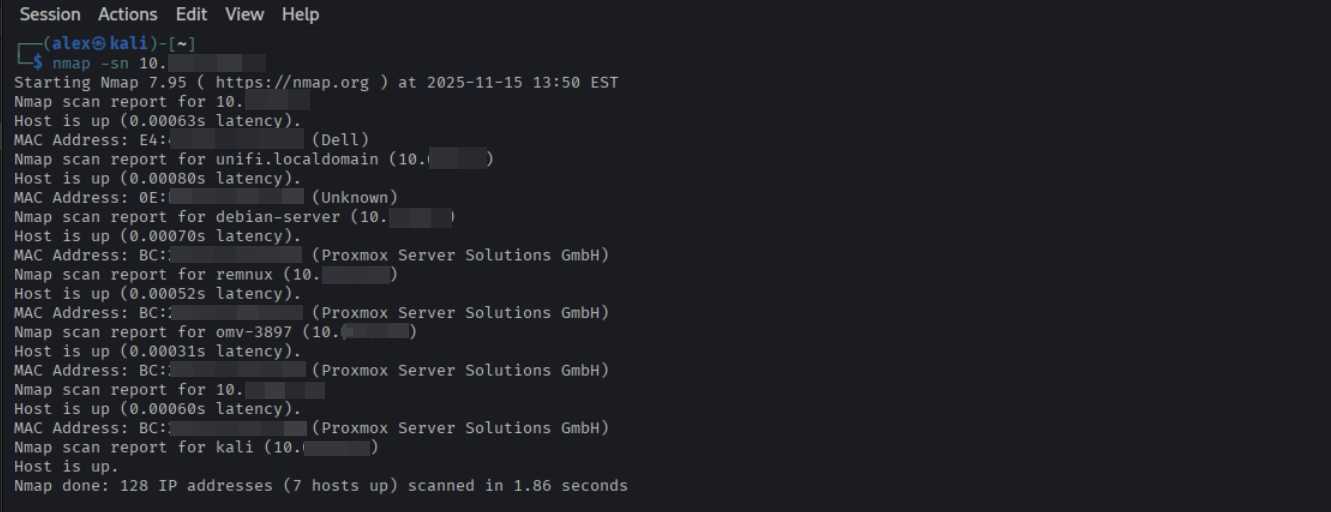
Before scanning ports or services, analysts typically begin with host discovery. This step identifies which systems in a network range are active. A simple way to do this is with Nmap’s ping sweep:
nmap -sn 192.168.1.0/24
The -sn flag disables port scanning, limiting the scan to ICMP echo requests and ARP probes. This makes it fast, lightweight, and safe for most networks. In defensive roles, host discovery helps identify unauthorized devices, unmanaged systems, or forgotten hosts still connected to the network.
For larger networks, you can combine ranges and subnets to map multiple segments at once:
nmap -sn 192.168.1.0/24 192.168.2.0/24
This method helps analysts quickly verify which network segments contain active hosts, making it easier to plan port scanning and vulnerability checks.
Performing a ping sweep to identify active hosts on a subnet.
Scanning for Open Ports
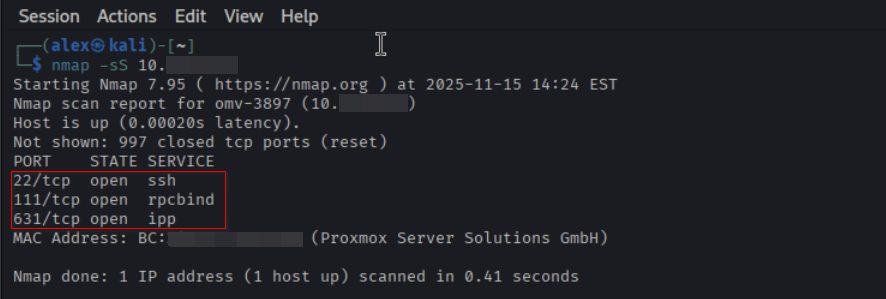
Once you know which systems are alive, the next step is to determine which ports are open. A basic port scan uses:
nmap -sT 192.168.1.42
This performs a full TCP connect scan, which is highly reliable and works even without raw packet privileges. If your system allows SYN scans, which are faster and more stealthy, you can use:
nmap -sS 192.168.1.42
Open ports reveal the attack surface of a system. Analysts use this information to validate firewall policies, identify unnecessary services, and detect misconfigurations. For example, discovering an exposed SMB port on a Linux workstation would be a red flag requiring immediate review.
Interpreting scan results in the context of firewall rules and endpoint protection logs helps determine whether an open port is expected or a potential vulnerability. Correlating data between Nmap and network monitoring tools is an essential step for defensive analysts.
Scanning for open ports to identify exposed services.
Service and Version Detection
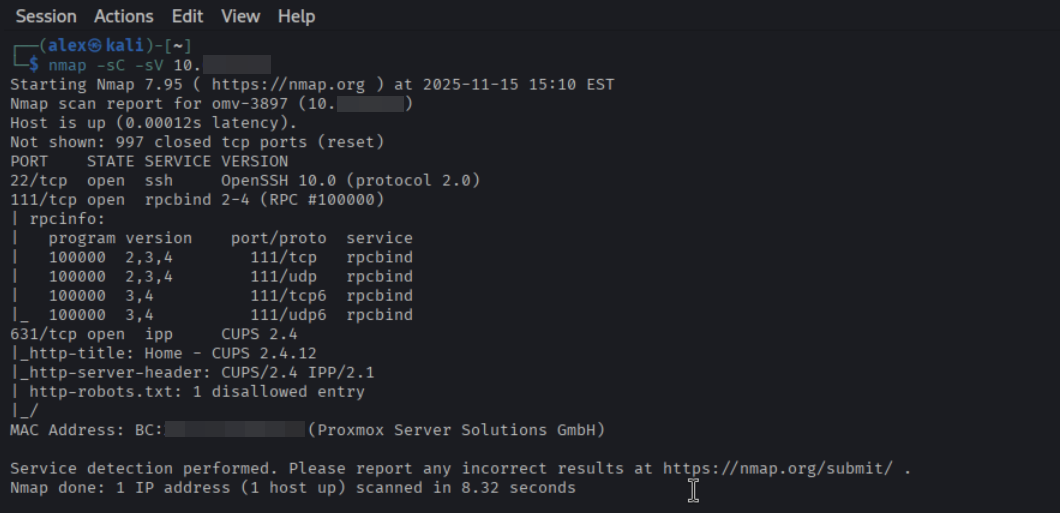
Nmap can identify what services are running behind open ports. Combining version detection with default scripts provides deeper visibility:
nmap -sC -sV 192.168.1.42
The -sV flag performs banner grabbing and protocol probing, while -sC runs Nmap’s safe default scripts to gather additional data such as SSL information, HTTP server headers, SSH versions, and more.
Service detection is crucial for identifying outdated software and matching versions against known vulnerabilities. Analysts often feed this information into vulnerability scanners or check CVE databases manually.
Identifying versions and service details using Nmap’s -sC and -sV flags.
Using the Nmap Scripting Engine (NSE)
Nmap becomes even more powerful with NSE, which provides targeted scripts for enumeration, vulnerability detection, authentication testing, and more. Some useful examples include:
NSE scripts enhance reconnaissance by performing deeper checks without requiring separate tools. However, some scripts are intrusive, so analysts should use caution and avoid running them on production environments without approval.
Always practice these scans in controlled lab environments to avoid impacting production networks or violating policies.
Relevance for CySA+ and Security Analysts
Nmap is included heavily in CySA+ exam objectives, especially in threat detection, vulnerability identification, and network reconnaissance. Beyond the exam, real-world analysts rely on Nmap for routine assessments, policy validation, and incident response. Understanding how to interpret scan results and integrate them with defensive tools, such as SIEM alerts, firewall logs, and vulnerability scanners, strengthens an analyst’s investigative workflow.
By mastering host discovery, port scanning, service enumeration, and NSE usage, analysts can quickly identify risks and make informed decisions during assessments or investigations. Nmap remains an essential foundational skill in defensive cybersecurity.