Back to Home
Introduction
When it comes to Linux system security, visibility is everything. If administrators cannot see what is happening on their systems, they cannot protect them effectively. This is where Auditd comes in. Auditd, short for Linux Audit Daemon, is a built-in framework that monitors and logs system activity at a very detailed level. It allows administrators and security professionals to track access to sensitive files, monitor user activity, and detect potential intrusions before they escalate.
Unlike traditional logging services such as syslog, Auditd is specifically designed for auditing security-related events. It captures details about who did what, when it happened, and how it was performed. This makes Auditd invaluable not only for troubleshooting but also for compliance and security monitoring.
Why Auditd Matters
Auditd is critical for compliance, security monitoring, and forensic investigations. In regulated industries such as healthcare and finance, audit logs provide proof that systems are being properly monitored. From a security perspective, it allows analysts to detect suspicious activity in real time and respond before damage occurs.
For example, if a malicious actor tries to tamper with user accounts by editing /etc/passwd, Auditd records the attempt. With the right configuration, these logs can be forwarded to a Security Information and Event Management (SIEM) platform, giving analysts visibility across multiple systems.
Installation
Auditd is included in most Linux distributions, but if it is missing it can be installed with the system package manager. On Debian-based systems, run:
sudo apt update
sudo apt install auditd audispd-plugins -y
Once installed, the Audit daemon runs as a background service. Its logs are usually stored in:
/var/log/audit/audit.log
This log file contains all monitored events and can grow quickly, so log rotation should be configured for production environments.
Adding Watch Rules for Critical Files
Auditd rules can be added to monitor multiple critical system files. For example:
sudo auditctl -w /etc/passwd -p wa -k user-modify
sudo auditctl -w /etc/shadow -p wa -k shadow-modify
sudo auditctl -w /etc/sudoers -p wa -k sudoers-modify
Explanation of the parameters:
-w /etc/passwd → Watch the /etc/passwd file.-w /etc/shadow → Watch the /etc/shadow file.-w /etc/sudoers → Watch the /etc/sudoers file.-p wa → Monitor for write (w) and attribute changes (a).-k <name> → Assign a key (makes searching easier later with ausearch -k).
This ensures that any modification to these critical files will be logged by Auditd.
Monitoring Critical Files in Practice
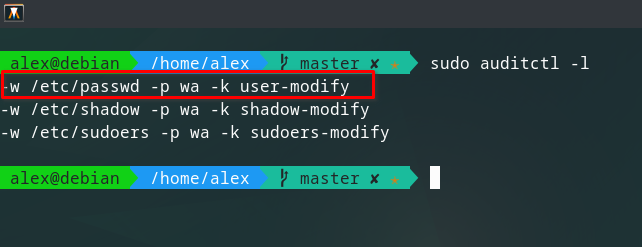
Figure 1: Listing current audit rules shows which files are being monitored and the keys assigned to them.
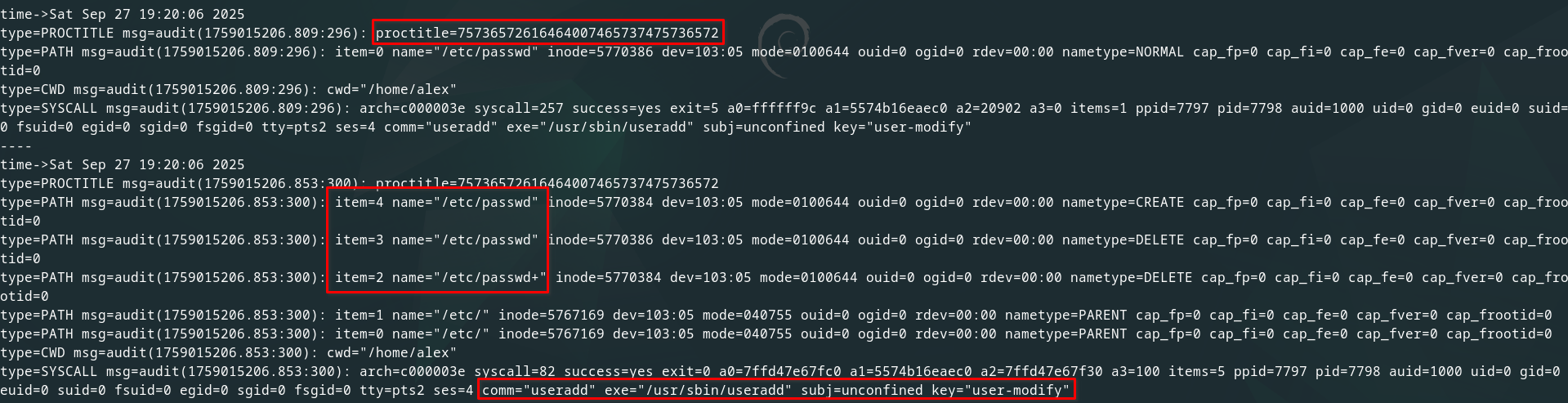
Figure 2: The proctitle field records the full command run (useradd testuser), while the PATH records show /etc/passwd being deleted and recreated. This is the normal safe-update process useradd uses to modify system files.
At 19:20:06, the useradd command modified /etc/passwd and /etc/shadow to create a new account:
- syscall 257 (openat) → the files
/etc/passwd and /etc/shadow were opened and written to.
- syscall 82 (rename) →
useradd used a safe-update method: writing to a temporary file, then renaming it into place inside /etc/.
The proctitle field stores the executed command in hex. For example:
75736572616464007465737475736572
Decodes to:
useradd testuser
Showing which user was created.
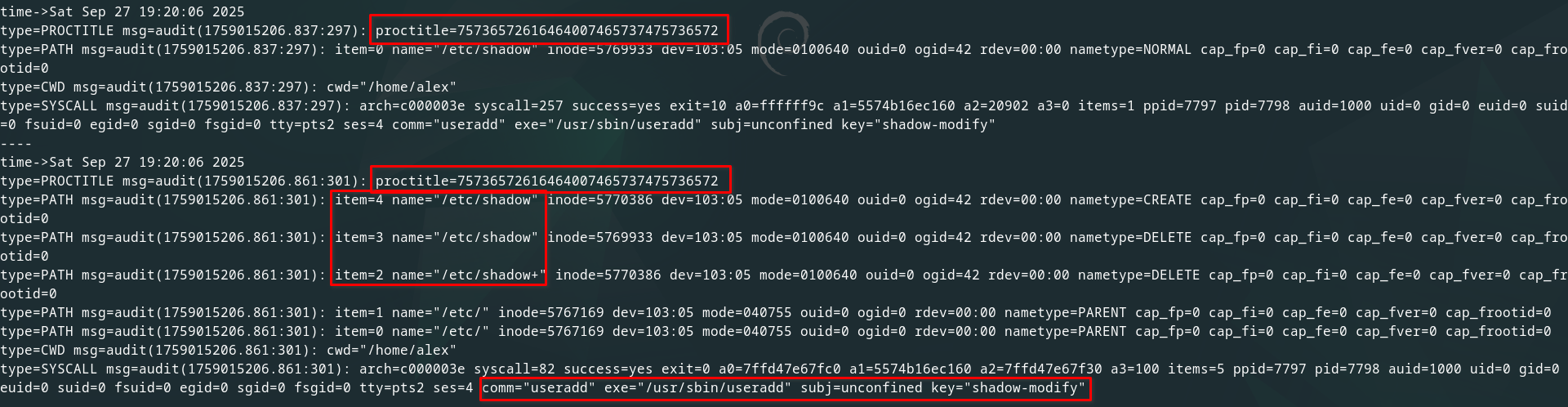
Figure 3: Audit logs show file opens and updates to /etc/shadow, capturing every modification to this sensitive file.
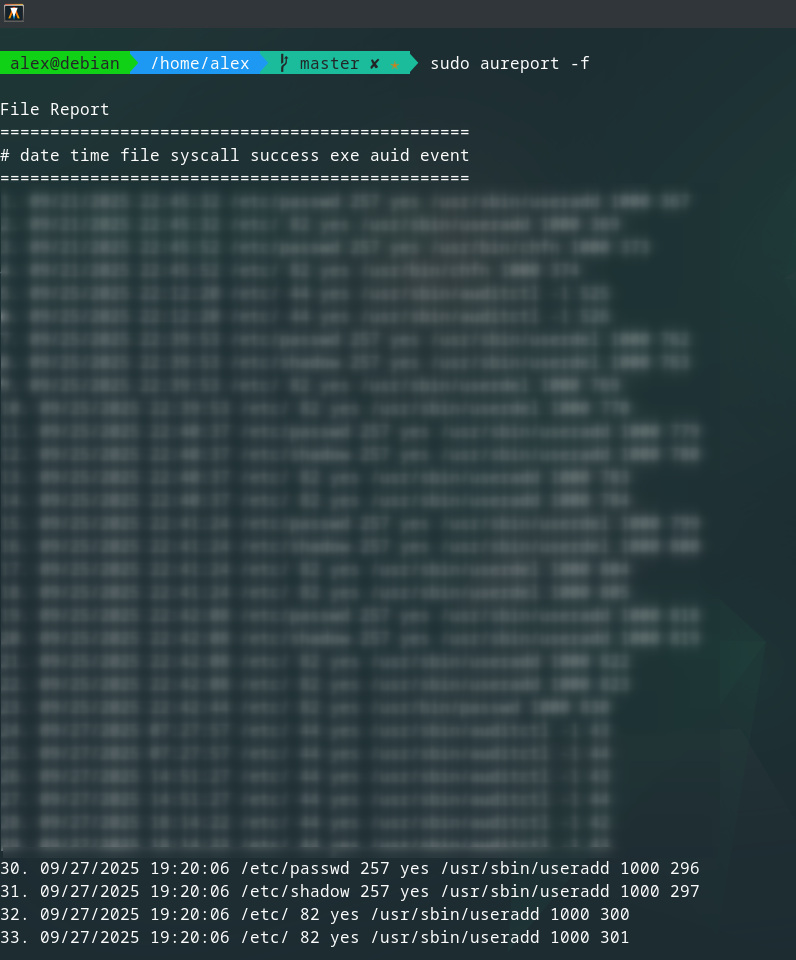
Figure 4: The aureport summary shows the timestamp, files accessed, system calls used, and the user performing the actions.
Use Cases for CySA+ Candidates
Auditd is not just a monitoring tool, it is also an excellent learning resource for analysts preparing for the CompTIA CySA+ certification. By configuring audit rules and analyzing real log output, candidates gain hands-on practice in system monitoring, event correlation, and forensic investigation. These are critical skills for success in both the exam and real-world security operations.
Conclusion
Auditd may appear complex at first because of the large amount of data it collects, but when configured carefully it becomes a powerful tool for tracking security events on Linux systems. By starting with focused rules such as monitoring /etc/passwd, administrators can gain valuable insights without being overwhelmed by noise.
For cybersecurity professionals and CySA+ candidates, mastering Auditd provides practical experience in monitoring, detection, and response. It builds a strong foundation for host-based defense and reinforces key skills required for defending critical systems.