Nikto is one of the most widely used open source tools for scanning web servers and identifying security issues.
It performs comprehensive tests against a target server and checks for outdated software versions, potentially dangerous
files, misconfigurations, and insecure default settings. Nikto is simple to use, extremely effective in lab environments,
and provides results that are easy for analysts to interpret. For CySA+ candidates and security professionals,
understanding Nikto is essential because it highlights many of the common vulnerability categories that appear in real world assessments.
This guide explains how to install Nikto on a Linux systems. It also covers essential scan types, how to interpret the output, and how to generate screenshots
that demonstrate useful findings.
All examples shown here are safe to run in a local environment or a controlled lab. You should avoid scanning servers
that you do not own or have explicit permission to test.
Installing Nikto
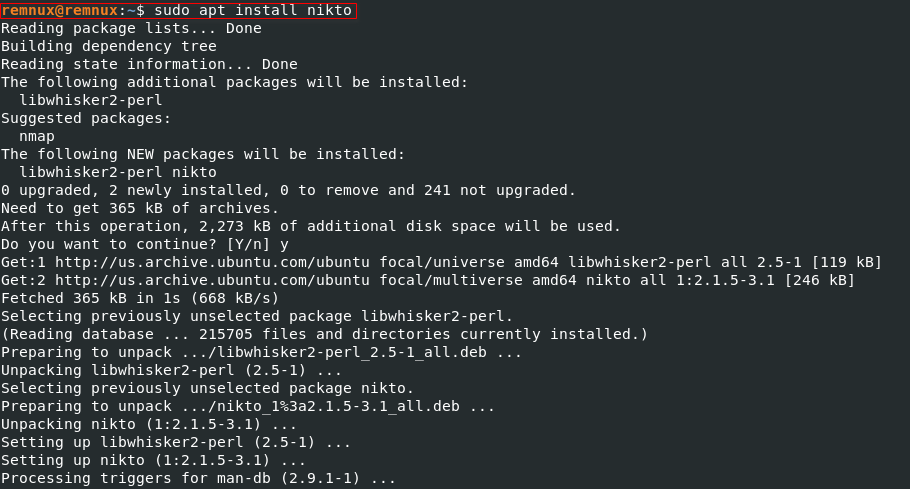
Installing Nikto on Debian based systems is straightforward because it is included in the official repositories.
To install it, simply run the following commands:
sudo apt update
sudo apt install nikto -y
Once installed, you can verify that the tool is available by checking its version:
sudo dpkg -l | grep nikto
Nikto does not require complex configuration. All its test signatures and scan modules are included by default.
Updating it is also easy. If you are using the repository version on Debian or Kali, updating through the package manager
will automatically keep the signature database current.
Nikto installation on a Linux (Debian-based) system.
Running a Basic Scan
A basic scan is usually the first step when evaluating a web server. It checks for outdated software versions,
insecure headers, exposed administrative interfaces, and many other issues. To run a simple scan, use:
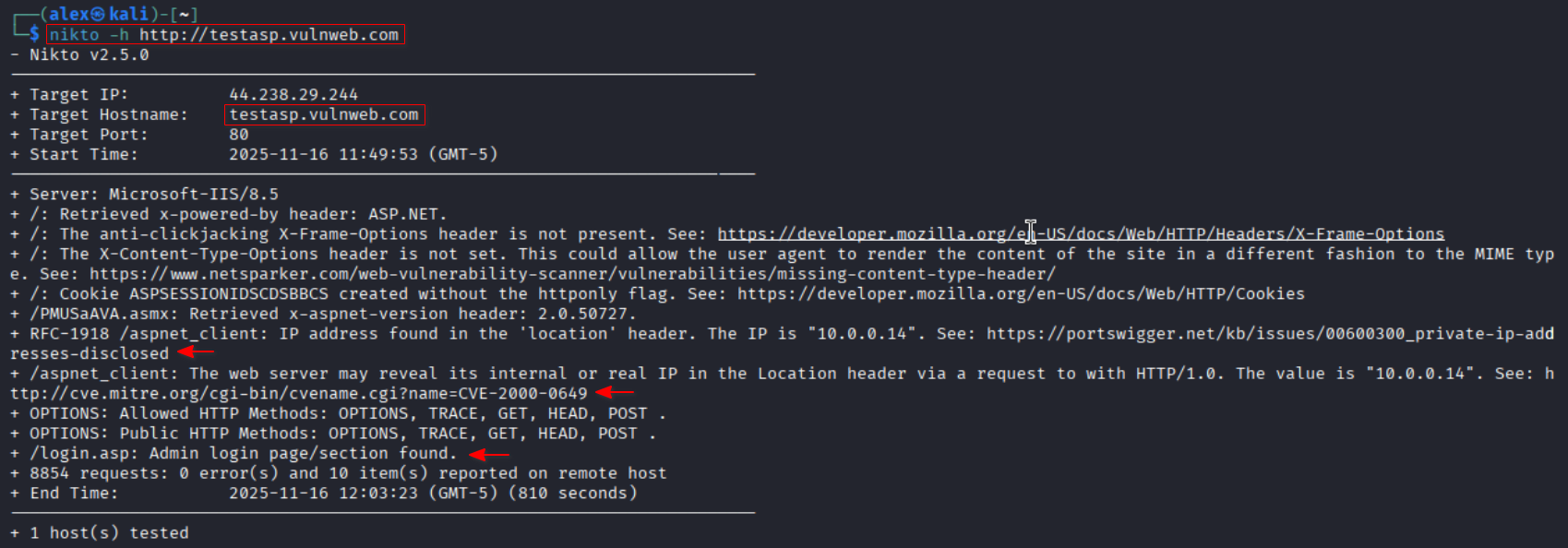
nikto -h http://TARGET_IP
The tool begins by identifying the server type, the software version, and any visible directory listings.
It then runs its full set of tests and prints results as it discovers findings. One of the strengths of Nikto
is that it provides immediate visibility into misconfigurations that administrators often overlook.
Findings may include exposed configuration backups, test scripts left behind by developers, or outdated components
such as old versions of Apache and PHP.
Running a basic Nikto scan to detect outdated versions and common misconfigurations.
Advanced Scan Options
Although a basic scan is often enough for training purposes, Nikto includes several advanced switches
that provide additional detail. One commonly used option is the SSL flag, which forces Nikto to scan an HTTPS server:
nikto -h https://TARGET_IP
Another useful option is the port flag. This is important when the web server is not running on the default port:
nikto -h TARGET_IP -p 8080
Nikto can also scan using its full tuning modes. Tuning modes select specific categories of tests. For example,
if you only want to run checks for outdated software, you can use:
nikto -h TARGET_IP -T 1
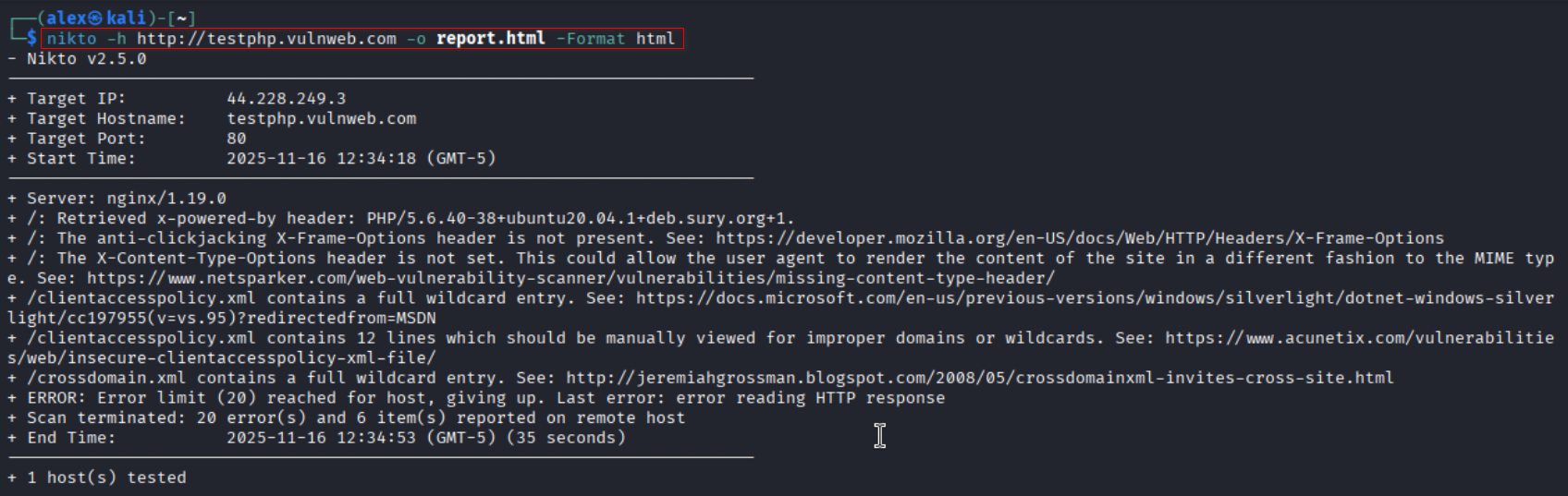
This is helpful during focused assessments or when you need to reduce noise. Nikto also supports output in multiple
formats such as HTML and XML. You can create a clean HTML report with the following:
nikto -h TARGET_IP -o report.html -Format html
This produces a neatly formatted report that can be included in documentation or used in CySA training assignments.
Generating an HTML report to document vulnerabilities found during a scan.
Why Nikto Matters
Nikto remains a valuable tool despite its simplicity because it serves as an effective first step in web server assessments.
It quickly uncovers common problems that attackers often exploit. These include outdated server software, missing security headers,
directory indexing, exposed backups, and default files that should not be publicly accessible. Many of these issues fall under
common vulnerability categories that CySA+ candidates study. Nikto helps reinforce an understanding of insecure configurations,
weak defaults, and poor maintenance practices.
Analysts should remember that Nikto is not a stealth tool and should not be used for quiet reconnaissance.
Its purpose is to highlight misconfigurations and identify low hanging fruit that often leads to deeper compromise.
When combined with other tools such as Nmap, Gobuster, and more advanced scanning frameworks, Nikto provides
foundational coverage that supports a complete assessment strategy. Learning to interpret its findings also strengthens
analytical thinking, pattern recognition, and documentation skills. These are essential for both CySA+ exam readiness
and real world security operations.